Tim Gross

Presenter Notes
- I'm Tim Gross
- I do DevOps and develop software infrastructure for DramaFever.
DramaFever

Presenter Notes
- Online television network specializing in bringing curated foreign television
- from places like East Asia and Latin America and Spain
- to a mostly North American audience of about 5 million
- with English and Spanish subtitles.
- We're a startup headquartered in NYC with the technical team working out of Narberth PA.
DramaFever, then

Presenter Notes
- Our core application is hosted on AWS.
- When I started with DramaFever, the entire infrastructure was a bunch of Linux EC2 instances running Django and Apache and Memcached, backed by MySQL RDS.
DramaFever, now

Presenter Notes
- (some of this is near-term speculative, not real # of instances)
- More complex architecture
- Multiple internal services
- DynamoDB
Falling In and Out of Love With DynamoDB

Presenter Notes
- Application & schema design
- Operations & cost control
- Lessons learned
- We bring stories to our users, I'm going to tell some stories
- Everything you ever wanted to know about DynamoDB but were afraid to ask.
Fan & Follow

Presenter Notes
Fan & Follow

Presenter Notes
- Totally not "Like" =)
- New feature come up from the product team to allow users to "fan" and "follow" particular series, episodes, actors, or each other.
Fan & Follow

Presenter Notes
- Trace relationships across arbitrary objects -- a graph database.
- Users to Actors and Series ("Fan")
- Users to Users ("Follow")
- Be able to trace backwards
Hierarchal Keys
Hash keys and range keys have a parent-child relationship.

Range keys are sorted, but only with the "bucket" of a given hash key.
Presenter Notes
- Big gotcha is that the keys have to be queried together.
- API queries allow hash-only query on a hash+range key (null BEGINS_WITH)
- Range keys are sorted, but only within the "bucket" of a hash key. (Important later)
- Can't ever say "give me all rows between A and B" without scanning.
Fan & Follow
Presenter Notes
- Natural hierarchy of keys
- Hash key is user you're asking about
- range key to find which actors, series, etc. the user is a fan of
The Firehose

Presenter Notes
- Analytics "pings" from our video players (Flash and native mobile clients).
- This data gets used to divvy up revenue among video assets
- Lets us and content owners get paid
- Core business function
The Firehose
Presenter Notes
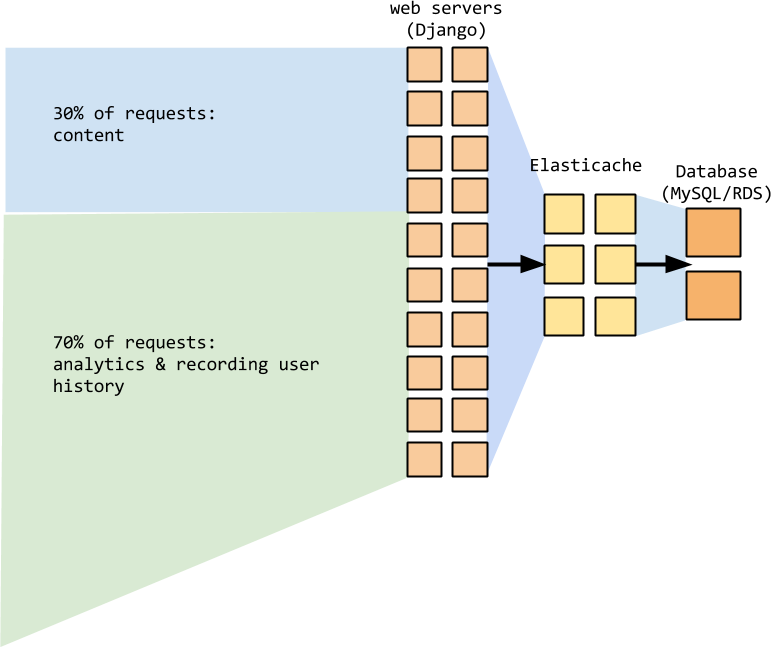
- But all that data was a) hitting the main Django application
- b) after a bunch of pre-processing, getting written into MySQL RDS.
- Giant append-only table of billions of rows, which isn't great.
- Traffic was about 70% of the total number of requests to the application.
Key schema and provisioning

Presenter Notes
- The problem with this came when we tested it.
- The actual write throughput was 1/10th of what we provisioned. =(
Key schema and provisioning

Leaking abstraction!
- AWS spins up instances to accept provisioned throughput (exact number undocumented.)
- Provisioned throughput distributed among these instances.
Hot hash key --> hot instance
Presenter Notes
- When you provision throughput, Amazon is spinning up N instances of whatever the underlying processes are.
- Your provisioned throughput is distributed among these instances.
- Rows are written to the instances based on the hash key, not the combined hash+range key. Duh, it's a hash, right?
- With hot key, throughput will be (provisioned throughput / however many instances Amazon has provisioned).
Key schema and provisioning

Presenter Notes
- Avoiding hot hash keys is key to DynamoDB performance.
- Division by provisioning means if you have a bad hash key you'll see diminishing returns on performance the higher you provision your throughput.
- This was also the hidden problem with using series/episode as hash.
- Plenty of key space, but too many hot writes (latest==popular).
Key schema and provisioning
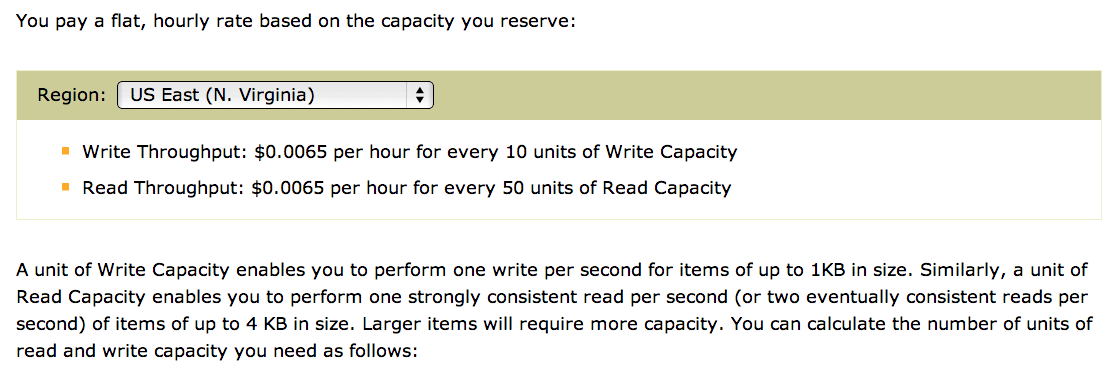
- Key schema design == direct operational cost
- Writes are at least 5x cost of reads.
Presenter Notes
- Can be even more than that if your rows are more than 1KB in size:
- a unit of read capacity gets you 1 consistent read of up to 4KB (or 2 eventually consistent reads)
- whereas the write unit is for 1KB writes.
Key schema and throughput
Cannot query timeseries data without doing EMR jobs.
1 results = []
2 for i in range(9999):
3     key = str(my_timestamp) % i
4     results.append(table.query(hash_key=key))
Presenter Notes
- Don't do this. This is terrible! 10000 round-trips!
- This tightly couples the use of DynamoDB to EMR for that kind of data.
Cost control
Presenter Notes
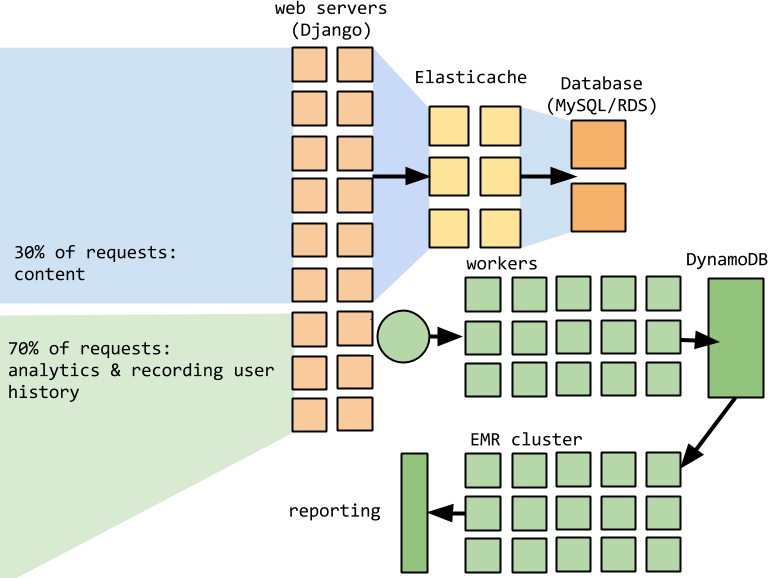
- SQS + Workers + DynamoDB provisioning + EMR == $$$
- Still hadn't solved the problem of all the load we were putting on our main application.
- Costs started escalating.
- Writing directly from web application --> writing one row at a time.
Asynchronous workers

Presenter Notes
- Split off the analytics requests to different web servers (running async processes)
- wrote to SQS, picked up by workers running async process
- doing batch-reads from SQS to queue up a batch-write of up to 25 rows.
- Dropped half our web servers and 70% of our workers.
- Batch writing to DynamoDB is critical to good production throughput.
Goodbye, DynamoDB!

Presenter Notes
- (flip back to previous slide to mention EMR/BI)
- Still had dependency on EMR.
- Wanted to give BI on this system, so we started using Redshift.
- Ultimately replaced this entire system with S3 logging hacks and Redshift.
Streamtracking
Presenter Notes
- Our premium users are treated to videos without advertisements.
- We limit the number of simultaneous streams for a premium user
- Reduce the risk of premium users sharing their account (revenue loss)
Throttling
Presenter Notes
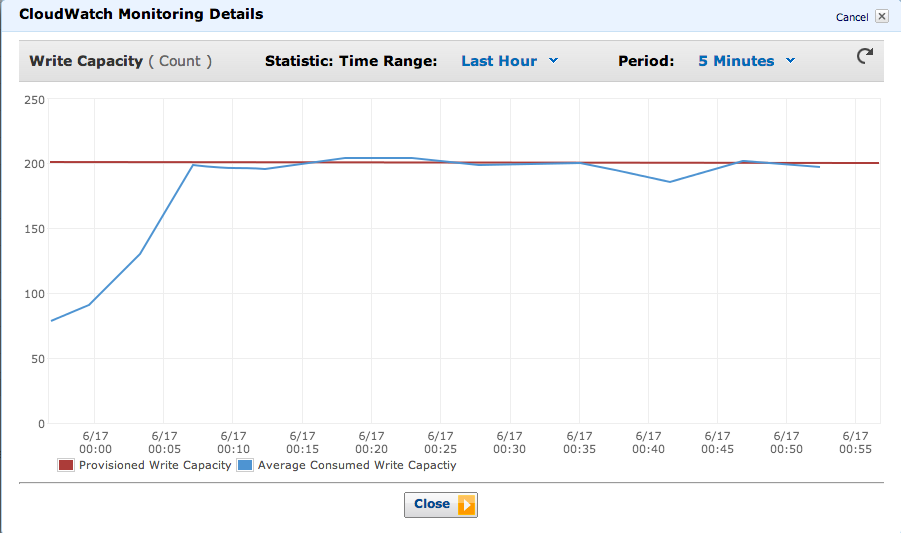
- It was hard to accurately estimate actual throughput on this, because we didn't know what the #s were on check frequency.
- We made an estimate and actual traffic was more than expected.
- Writes to DynamoDB should be asynchronous
- If you get throttled, you'll end up blocking the web thread.
- We got occassionally throttled due to spikey loads, and it blocked the web thread.
DynamoDB monitoring is terrible
Presenter Notes
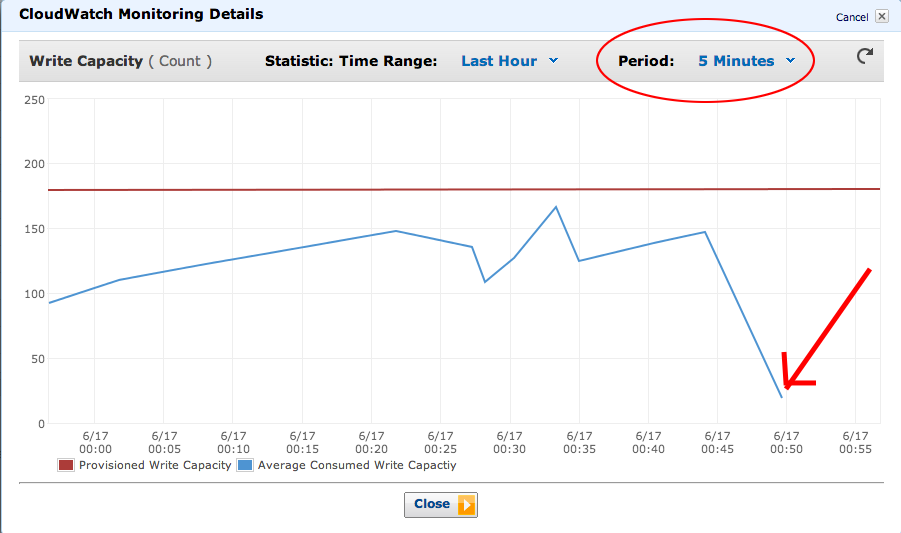
- The smallest resolution you can get on throughput is 5 minutes
- Cloudwatch metrics often lag by 10-15 minutes
- This means you can be throttled but your monitoring systems won't tell you until it's too late!
... but it was worse
Presenter Notes
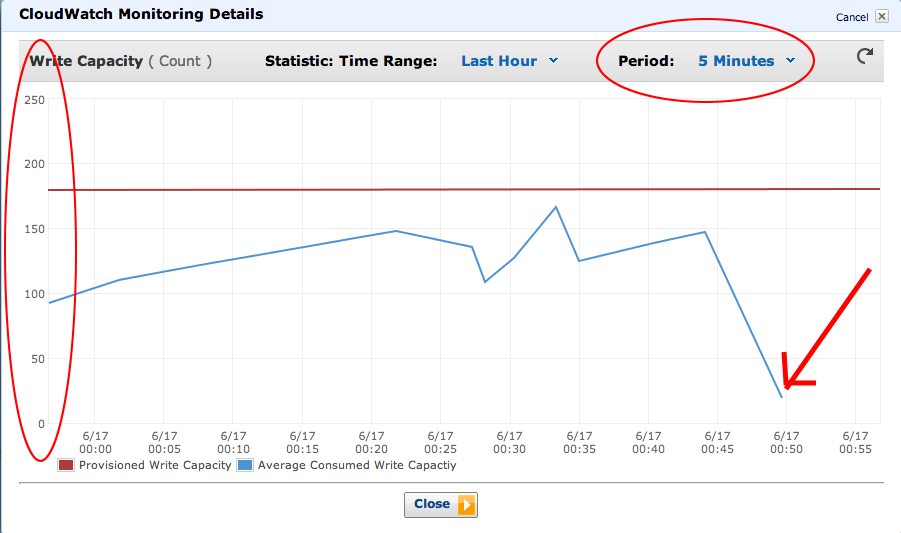
- Up until a couple months ago, the Cloudwatch metrics had a different scale of units vs time than the provisioning, and that scale was undocumented!
- Turned out to be tied to the monitoring resolution -- 5 minutes.
- "3000" in your Cloudwatch metric, that represented a throughput of 10 writes/second.
- Cloudwatch metrics are still messed up, but at least the monitoring interface for DynamoDB will give you numbers in the same units you provision in now.
- Pointed this out to DynamoDB guys, so I'm taking credit for it.
YMMV

Presenter Notes
- We have a load that varies 5x between morning and evenings.
- "Prime time television" still exists on the web.
- You may need to overprovision and then scale down once you understand the average load.
- (Or do detailed load testing, but we never seem to do that.)
User History

Presenter Notes
- Still had a lot of write pressure on the main database.
- The biggest case of this is what we called UserEpisode and ContinueWatching.
- Let the user resume watching a video where they left off.
User History
Presenter Notes
- Lots of INSERTS and UPDATES on a very large MySQL InnoDB table
- heavily indexing due to all the queries we had to make on it
- poor performance and lots of table locks.
Is DynamoDB the right tool
for the job?
- Poor key design --> cost & pain
- Batch write with high concurrency
- Use active monitoring and throughput estimation